

Over the past two days, Efiwe shipped a set of updates that all come from the same place: what learners told us. A learner should never lose the work they have done, and should always be able to see where they are and what comes next. This is everything that changed, across all eight courses.
Efiwe has three learning modes. Beginner takes every challenge in order. Skipper lets a learner skip what they already know. Explorer lets them pick the challenges they want. Until now, changing mode part-way through a course sent the learner back to the very beginning, and their points, badges and completed challenges were wiped. Learners complained about this, and they were right.
“A learner who has worked through dozens of challenges on a small phone has earned every one of them,” says Chidi Nwaogu, Efiwe’s co-founder and CTO. “We do not want anyone losing their progress in any way, for any reason.” Learners now keep everything when they switch. Points, badges, completed challenges and the certificate stay exactly as they are, and only the rules for the challenges still ahead change. Moving into Explorer keeps completed work on the learner’s list, so they simply choose from what is left. A learner who had already finished their Explorer list is taken straight to their next unfinished challenge. The warning that said progress would be deleted is gone, because it no longer applies.
Your learning path, always in view
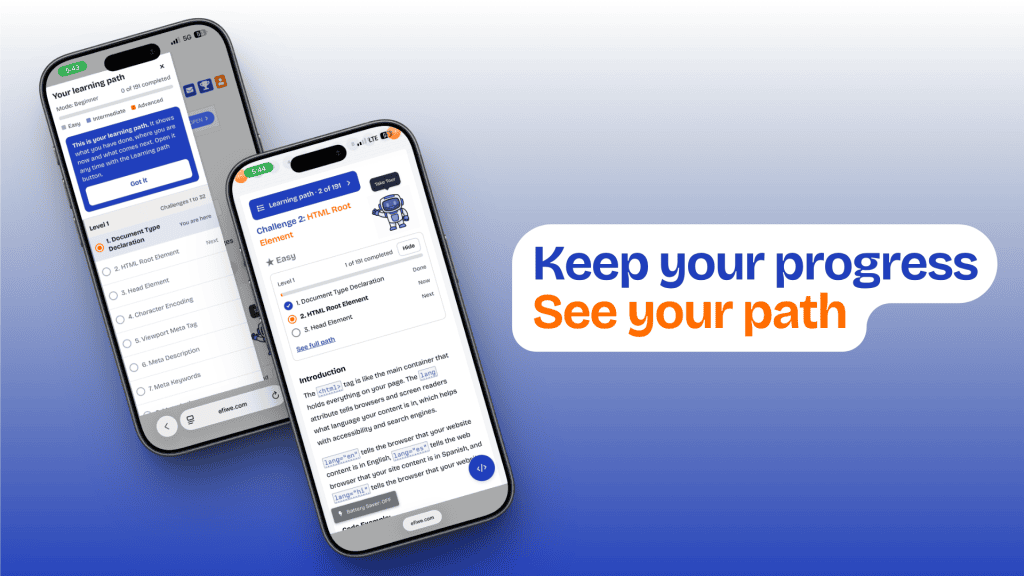
The learning path, the full list of challenges in a course, used to sit behind a small menu icon with no label. A learner who did not already know what that icon meant would never have found it. “Many of our learners are using a learning app for the first time,” says Nwaogu. “If a feature depends on knowing what three small lines mean, then for them that feature does not exist.”
The icon is now a button that says what it opens and where the learner is, for example “Learning path · 12 of 191”. Under every challenge title there is now a short summary showing the level, the number of challenges completed, and the previous, current and next challenge. Learners who prefer a cleaner screen can fold it away with “Hide” and bring it back with “Show”. The full list has been rebuilt as well. It is now titled “Your learning path”, marks each challenge as Done, Skipped, You are here or Next, groups challenges by level, and shows the levels still to come as locked. New learners see a short note pointing to the button, and the guided tour now explains it. On a wide screen, the path stays open beside the course. For learners in Explorer mode, all of this counts only the challenges they chose.
A smoother Explorer mode
Explorer, the mode where learners build their own list of challenges, had a few rough edges. The search box now works: typing shows only the challenges that match, both at the start of a course and when changing mode. Pressing Enter no longer clears the results, and a message appears when nothing matches.
A learner who completes every challenge they chose and then refreshes the page now returns to the last challenge on their own list, with the certificate button showing. Before, they landed on the last challenge of the whole course. Restart now begins on the learner’s first chosen challenge, where it used to drop them on challenge 1 even when that was not on their list. And challenges that Efiwe finishes on a learner’s behalf are now described the same way in every course: “completed for you”.
Reset, Skip and Restart now do what you expect
While fixing mode switching, we looked closely at how progress is saved online and found several places where it could go wrong. All of them are fixed. Resetting a challenge is now saved properly. Before, a reset took the learner’s points away at once, but after a page refresh the challenge came back as completed while the points stayed deducted. A reset is now saved in full, and solving the challenge again restores the points. A skipped challenge that a learner goes back and solves now counts as completed, where it used to stay marked as skipped. Equally, a challenge that is reopened is never counted until it is actually solved.
Restart is now a clean start, with no skips carried over from a previous attempt. A mode chosen at the very start of a course no longer disappears on slower connections. And refreshing after a mode switch returns the learner to their next unfinished challenge, not to the end of the course.
Understanding how learning actually happens
Until now, Efiwe only knew where each learner was at this moment. It could not tell when a challenge was completed, how long it took, or how many attempts it needed. Efiwe now keeps a history of learning. For each challenge it records when the learner started, each attempt that did not pass, and when they completed it, along with skips, resets, mode changes and restarts.
“Until now we could see where a learner was, but not how they got there,” says Nwaogu. “Knowing which challenges take the longest and need the most attempts tells us exactly where the course has to get better.” We were careful about three things. Time is measured fairly: the clock runs only while the challenge is on screen, and a locked phone or a closed browser stops it. It works offline: what a learner does without a connection is kept on their device and sent when they are back online and signed in. And it is private: learners can only add to and read their own history, nobody using the app can change or delete it, and it is removed if the account is deleted. We also now count how often the learning path is opened, so we can tell whether the new design is working.
Smaller fixes
Two smaller things were fixed along the way. In the Code Playground, the tip about the Efiwe IDE used to sit in the wrong place on wide screens, squeezed under the code editor. It now sits above the Save, Run and Diagnose buttons, as it does on a phone. The guided tour now describes the learning path and the mode button correctly, and no longer says that switching mode restarts the course.
Available in every course
All of these updates apply to all eight Efiwe courses: HTML, CSS, JavaScript, Tailwind, Python, SQL, PHP and Prompt Engineering. Every change here started with something a learner or a partner told us. If something on Efiwe gets in your way, tell us. That is how the next list of updates gets written.
or