

Efiwe has worked offline since day one. Today we are upgrading the two things learners lean on most when the connection drops: the AI tutor and Read Aloud. You can now download one of ten AI models that run on your phone, and natural-sounding offline voices for Read Aloud.
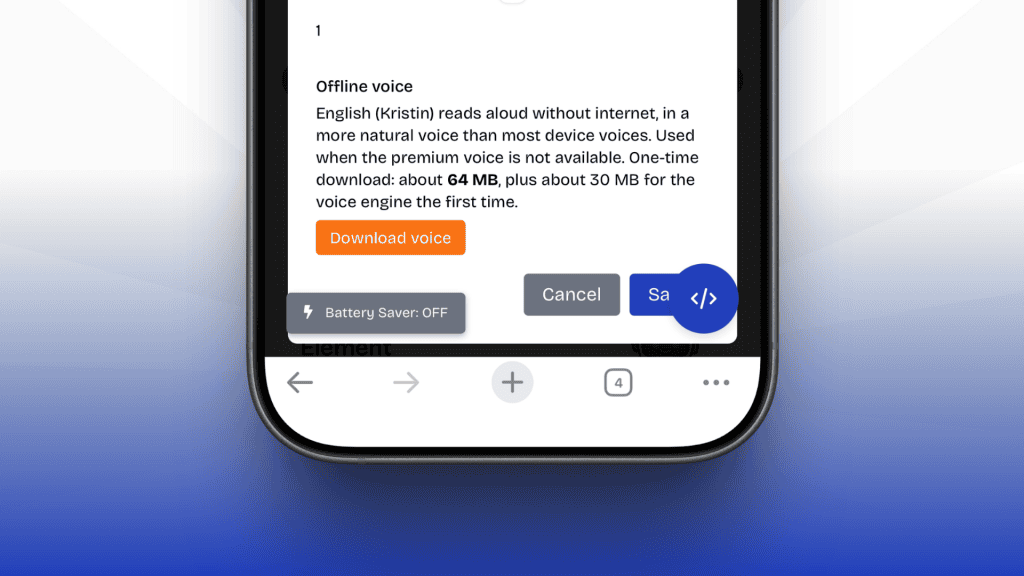
Until now, learning offline meant Efiwe 1.5, our on-device model that checks your code and explains your mistakes, while Read Aloud used your phone’s built-in voice whenever ElevenLabs was not available. Efiwe 2.0 in the cloud gave the richest explanations, but only online. This release brings fuller explanations and a more natural voice to learners with no connection, and takes nothing away.
Upgrade 1: ten AI models that run on your phone
The AI model dropdown under each challenge still offers Efiwe 2.0 (cloud) and Efiwe 1.5 (on-device). It now also lists ten small language models. Pick one, download it once, and it answers Show Hint, Diagnose Issue and Learn More in fuller, more conversational language, entirely on your phone.
| Model | Made by | Download size |
|---|---|---|
| SmolLM2 135M | Hugging Face | 105 MB |
| LFM2 350M | Liquid AI | 229 MB |
| Gemma 3 270M compact | 253 MB | |
| SmolLM2 360M | Hugging Face | 271 MB |
| Gemma 3 270M | 292 MB | |
| LFM2 700M | Liquid AI | 469 MB |
| Qwen 2.5 0.5B | Qwen team, Alibaba | 491 MB |
| LFM2 1.2B | Liquid AI | 731 MB |
| Gemma 3 1B | 806 MB | |
| Qwen 2.5 1.5B | Qwen team, Alibaba | 1.1 GB |
Answers stay grounded in your code. Small models can make things up, so we never ask them to guess. Before a model speaks, Efiwe 1.5 (our on-device model) checks your code and hands the model the facts: what is missing, what is misspelled, which line is off. The model’s job is to explain those facts in plain, friendly words. Every answer then passes a quality check. If it is empty, cut off, repeats the question, or misses the facts, Efiwe drops it and Efiwe 1.5 answers instead.
Submit stays exact. Marking an answer right or wrong is still done by Efiwe 1.5 offline, which compares what your code produces with what the solution produces. None of the ten small language models decide whether you pass.
You always get an answer. If your chosen model is too slow on your phone or cannot load, Efiwe 1.5 steps in. If you use Efiwe 2.0 and lose your connection, Efiwe can fall back to a model you have downloaded before falling back to 1.5. The panel under the dropdown always tells you which model answered and why.
Upgrade 2: natural offline voices for Read Aloud
Read Aloud has always worked offline through your phone’s built-in voice. Now you can download a natural-sounding voice that lives on your phone instead. It reads lessons, tasks, hints and diagnoses with no connection, and still highlights each word as it speaks, with pause, resume and stop.
The first offline voices cover five languages:
- English (Kristin)
- French (Siwis)
- Spanish (Davefx)
- Portuguese, Brazil (Faber)
- Portuguese, Portugal (Tugão)
The new voice adds one step to the order Read Aloud already follows. When you are online and have a premium read available, ElevenLabs still speaks first. Next comes your downloaded offline voice, if you have one for your language. After that, Android TTS and your browser’s voice take over, exactly as before.
How to get started
To use an on-device AI model:
- Open any challenge in any course.
- In the AI model dropdown under the challenge, pick one of the ten models.
- Tap Download in the panel below it and wait for the progress bar to finish. Wi-Fi is best.
- When the panel says the model is ready and works offline, tap Show Hint, Diagnose Issue or Learn More as usual.
To use an offline Read Aloud voice:
- Open TTS settings.
- Choose your language: English, French, Spanish or Portuguese.
- Tap Download under the offline voice for that language.
- Press play on any lesson. You can now switch off your data and keep listening.
AI model downloads pick up where they stopped if your connection drops, so you never start a big download from zero. You can remove a model or a voice from the same panel at any time to free up space.
Good to know
- Which model to pick. Start small. SmolLM2 360M or LFM2 350M answers quickly on most phones. If your phone handles it well, try Qwen 2.5 1.5B or Gemma 3 1B for richer explanations.
- Language. The SmolLM2 models answer in English only. For other languages, choose Gemma, Qwen or LFM2.
- Space and memory. Models take 105 MB to 1.1 GB. Each voice is about 63 MB, plus about 30 MB once for the voice engine that all voices share. Larger models need more memory, and some phones, especially iPhones, may close the page if a model is too big. Efiwe remembers this and steers you to a lighter setting next time.
- Speed. Expect a few seconds to answer, more on older phones. If a model keeps taking too long, Efiwe 1.5 answers so you are never left waiting.
- Privacy. On-device models and offline voices run entirely on your phone. Your code and the text being read never leave it.
Credits and what’s next
These features stand on open work from many teams, and we are grateful to them.
- AI models: SmolLM2 by Hugging Face and Qwen 2.5 by the Qwen team (Apache 2.0), Gemma 3 by Google (Gemma Terms of Use), and LFM2 by Liquid AI (LFM Open License 1.0). They run in the browser through wllama, built on llama.cpp (MIT).
- Voices: Piper voices running on ONNX Runtime Web (MIT). English (Kristin) is trained on public domain LibriVox recordings. French (Siwis) uses the SIWIS French Speech Synthesis Database (CC BY 4.0). Spanish (Davefx) and both Portuguese voices come from OHF-Voice (CC0).
Open any challenge, pick a model, download a voice, and try a lesson with your data switched off. Tell us how it goes.
or