

Since Group Accounts launched, schools, NGOs, bootcamps, teachers and community programmes have used Efiwe to run structured coding education across Nigeria, India and beyond, with learners working entirely on their smartphones and no computer lab required. As these groups have grown, one request has come up again and again. A school rarely teaches coding to one big room. It teaches JSS 2A and JSS 2B, the Saturday club and the after-school cohort, each with its own teacher and its own pace. Until now, every learner in an Efiwe group sat in a single list, and every sub-admin saw everyone. Today we are changing that with Sub-Groups.
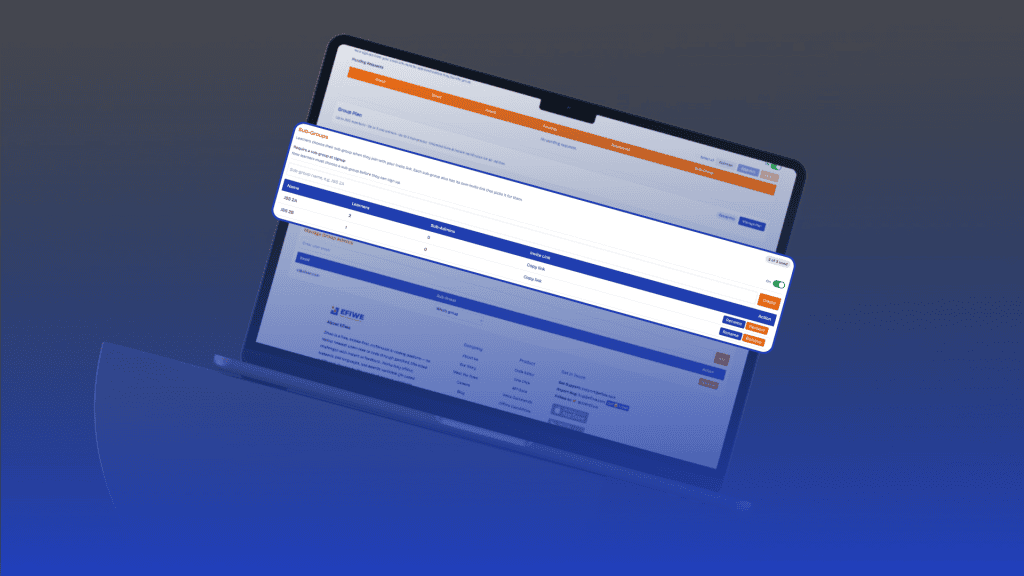
Sub-Groups let a group owner divide their group into classes, cohorts or teams, assign a sub-admin to each one, and give that sub-admin a dashboard built entirely around their own learners. The owner still sees the whole group, while each teacher sees only the students they are responsible for.
Setting up sub-groups takes a few seconds. In the Group Tools tab of the group dashboard, the owner can create sub-groups with names that match how the programme is actually run, such as “JSS 2A”, “Cohort 3”, or “Girls Who Code Club”, and can rename or remove them whenever things change. Only the group owner can create, rename or remove sub-groups.
Joining works the same way it always has, through the group’s invite link, with one addition. When a group has sub-groups, the signup page lets each new learner choose the sub-group they belong to, and the owner can decide whether that choice is optional or required. Every sub-group also has its own invite link. When a teacher shares the “JSS 2A” link with their class, every learner who signs up through it is placed in JSS 2A automatically, with nothing extra to choose. Member caps and membership moderation apply exactly as before, and a learner who joins a moderated group appears in their chosen sub-group as soon as they are approved.
The biggest change is for sub-admins. In Manage Group Admins, the owner can now assign each sub-admin to a sub-group. From that moment, everything that sub-admin sees is limited to their own learners. The learner table in Group Stats, with its progress, scores, capstones and certificates, shows only their sub-group, and so do the member count, countries and the number of learners online now. The AI-generated Stats Summary describes their sub-group rather than the whole group. The weekly growth summary email that arrives every Monday covers their learners, with its own week-over-week comparison. In a moderated group, the pending queue shows only the requests from learners who chose their sub-group, so they can approve or reject their own new students. Grade promotions work the same way: a sub-admin can promote their own learners and no one else’s. Sub-admins who are not assigned to a sub-group keep seeing the whole group, exactly as they do today.
This separation is not simply a matter of hiding rows on the screen. Like grade promotions and moderation, every rule is enforced on Efiwe’s servers, so an owner can hand dashboard access to a teacher knowing that the teacher can only reach the learners in their own sub-group.
Mistakes are easy to fix. If a learner joins the wrong sub-group, the owner can select them in the Group Stats table and use the Change Sub-Group button to move them. Several learners can be moved in one go, as long as they are all currently in the same sub-group, which keeps bulk changes predictable and prevents classes from being mixed by accident. When learners in different sub-groups are selected, the button explains why it cannot be used. Removing a sub-group is just as safe. If it still has learners, Efiwe asks the owner where they should go, either into another sub-group or into no sub-group at all. Their accounts, progress, certificates and streaks are never affected. Any sub-admin assigned to a removed sub-group goes back to seeing the whole group, and the owner is told this before confirming.
Sub-Groups are part of Efiwe’s paid Group Plans. Group Pro, which supports up to 300 members and 3 sub-admins, includes up to 3 sub-groups. Group Pro Plus, which supports up to 600 members and 6 sub-admins, includes up to 6 sub-groups. Group Starter remains free forever for up to 30 learners, and owners on Starter can upgrade from the Group Plan section of the dashboard at any time, monthly or yearly.
To get started, open your group dashboard, go to the Group Tools tab and create your first sub-group in the Sub-Groups section. Copy its invite link and share it with that class, then assign a sub-admin to it in Manage Group Admins. Your learners keep learning HTML, CSS, JavaScript, Tailwind, Python, SQL, PHP and Prompt Engineering on their phones, and every teacher now has a dashboard that shows their own class and nothing else.
If you have questions or feedback, email us at support@efiwe.com. We would love to hear how your group is using Sub-Groups.
or