

One Click has been updated with phone number sign-in matching the main Efiwe platform, interview questions saved separately for each tracked application, editable application statuses in the Application Tracker, an offline mode that keeps auto-fill working without an internet connection, and a rewritten set of error messages that tell users exactly what went wrong rather than failing silently.
Efiwe today announced five upgrades to One Click, its free AI-powered extension for job seekers, shipping to both Chrome and Firefox at once. The updates introduce phone number login to the extension for the first time, give every tracked application its own saved set of interview questions, make application statuses editable directly in the tracker, allow auto-fill to keep working when a user loses their internet connection, and replace generic failure messages with specific guidance throughout the product.
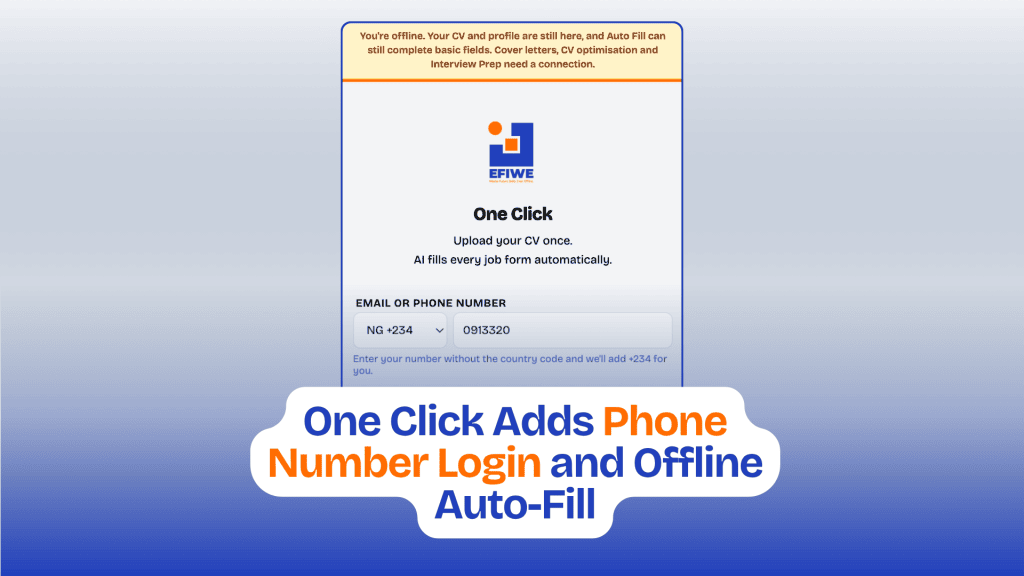
Phone number login closes a gap between the extension and the main Efiwe platform, where phone sign-in has been available for some time. The sign-in field now accepts either an email address or a phone number, and a country selector appears automatically once what has been typed stops looking like an email. Numbers can be entered in whatever format is natural to the user, including a local number with a leading zero, a bare national number, or a full international number with a country code, and the extension converts it to a standard format before signing in. A number typed with a country code always takes precedence over the country selector. Phone login works for any learner who has added their number to their Efiwe account on the website.
“A lot of our learners think of their phone number as their identity online, not their email address,” said Chidi Nwaogu, Co-founder and CTO of Efiwe. “We added phone login to efiwe.com because that is how people actually sign in across most of the products they use here. Leaving the extension email-only meant asking those same learners to remember a second thing about themselves, which is a strange thing to demand at the exact moment they are trying to apply for a job.”
Interview Prep now stores a separate set of questions for every application in the tracker. Previously the extension kept only the most recent set, so generating questions for one company replaced the questions generated for another, and closing the extension lost them entirely. Each tracked application now has a Prep button that opens Interview Prep bound to that specific role, showing the company and job title at the top of the screen and restoring whatever questions, job description, and focus area were last used for it. Applications that already have questions saved are marked in the tracker, so a user interviewing with several companies at once can see at a glance what they have prepared for and what they have not. Existing question sets are carried over automatically.
The Application Tracker also gains editable statuses. The status shown on each application is now a dropdown, so users can move a role through Applied, Interviewing, Offer, Rejected, and Withdrawn as it progresses, and the change saves immediately. Deleting an application now asks for confirmation before removing it, and clears that application’s saved interview questions along with it.
An offline mode addresses what happens when a user loses connectivity mid-search. One Click stores CVs and profiles on the user’s own device, so that information remains available regardless of connection. The extension now detects when it is offline and continues to auto-fill the fields it can match directly from a saved profile, including name, email, phone number, location, and portfolio links, without involving the AI at all. A banner explains what is and is not available, and the features that genuinely require a connection, such as cover letter generation and CV optimisation, say so rather than failing without explanation. Offline fills do not count against the free usage limit, since no AI request is made.
“Connectivity here is not a binary thing, it comes and goes,” Nwaogu added. “Someone filling in applications on mobile data can drop offline halfway through a form. The worst outcome is a tool that just stops responding and leaves you guessing whether it is broken or you are. Filling what we can and being honest about the rest is far more useful than pretending nothing happened.”
The release also rewrites error messages across the extension. Sign-in now identifies which specific field is missing or malformed rather than repeating a single generic prompt, distinguishing between a missing password, an incomplete email address, and a phone number that is too short, and placing the cursor in the field that needs correcting. Failed sign-ins explain whether the problem is an incorrect password, an unconfirmed email address, too many attempts, or a lost connection. When auto-fill cannot read a page because site access has not been granted, it now says so and explains how to fix it, rather than reporting an unexplained failure.
All five updates are available immediately and free to all users, on both Chrome and Firefox. One Click is available at efiwe.com/oneclick.
or